
OpenClaw 报错解决:`GatewayClientRequestError: pairing required`
OpenClaw 报错解决:GatewayClientRequestError: pairing required
一、问题现象
在使用 OpenClaw 时,gateway 频繁报错,日志如下:
01:51:30+00:00 error gateway connect failed: GatewayClientRequestError: pairing required
01:51:30+00:00 warn gateway/ws ... reason=scope-upgrade ... closed before connect
01:51:31+00:00 warn gateway security audit: device access upgrade requested reason=scope-upgrade
01:51:32+00:00 error gateway connect failed: GatewayClientRequestError: pairing required
如下图: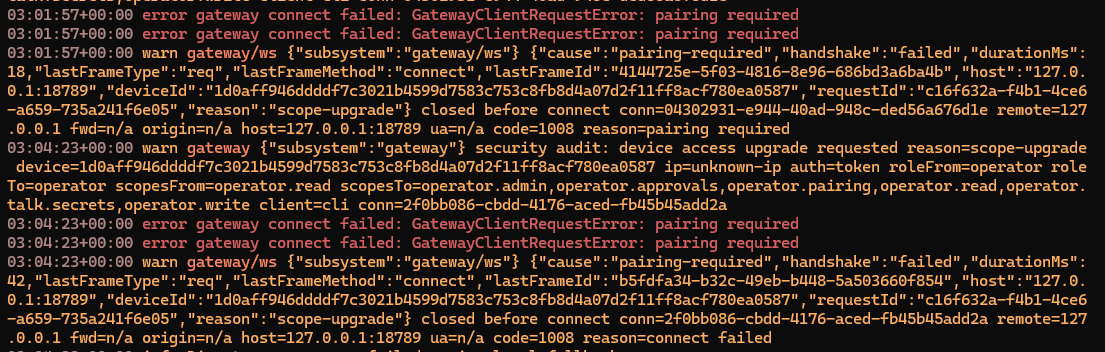
CLI 执行任何命令(如 openclaw tui、openclaw gateway status、openclaw devices list 等)均提示:
gateway connect failed: GatewayClientRequestError: pairing required
设备 ID(deviceId)通常为长字符串,例如:
1d0aff946ddddf7c3021b4599d7583c753c8fb8d4a07d2f11ff8acf780ea0587
二、根本原因
这是 OpenClaw 首次配对(Pairing)流程 的正常行为,并非 Bug。
- OpenClaw 采用 设备级权限控制(scopes)机制。
- 新设备(或新 token)首次连接时,gateway 会要求
pairing权限进行授权。 - 日志中的
reason=scope-upgrade表示:当前连接的 scopes 不足(从operator.read升级到operator.admin、operator.pairing等)。 - CLI 默认使用低权限 token,导致“鸡生蛋”循环:想批准设备,却连不上 gateway。
三、标准解决流程(推荐)
步骤 1:在运行 gateway 的同一主机执行
openclaw devices list会列出所有 pending 的配对请求,找到对应的 requestId。
步骤 2:批准设备
# 使用 list 里显示的 requestId
openclaw devices approve <requestId>

# 或者直接批准最新的请求(最常用)
openclaw devices approve --latest
步骤 3:重启 gateway
openclaw gateway restart完成后,CLI 即可正常连接,日志不再刷 pairing required。
四、特殊情况处理(CLI 自己也报 pairing required)
部分新安装或 Docker 环境下,openclaw devices list 也会报错。此时需要手动提升 scopes:
编辑配对配置文件:
nano ~/.openclaw/devices/paired.json找到你的
deviceId,将scopes数组修改为:"scopes": [ "operator.read", "operator.admin", "operator.approvals", "operator.pairing", "operator.talk.secrets", "operator.write" ](同时检查
tokens.operator.scopes,同步修改)保存后重启:
openclaw gateway restart
五、Docker 部署专属方案
# 进入容器执行(替换容器名)
docker exec -e OPENCLAW_GATEWAY_TOKEN=你的token \
  -it openclaw-gateway \
  openclaw devices list

# 批准同理
docker exec -e OPENCLAW_GATEWAY_TOKEN=你的token \
  -it openclaw-gateway \
  openclaw devices approve --latest
Token 位置:宿主机 ~/.openclaw/openclaw.json
六、其他快捷命令
- 一键诊断修复:
openclaw doctor --fix - 重启系统服务:
systemctl --user restart openclaw-gateway - 查看完整设备列表:
openclaw devices list --all
七、总结与预防
- 第一次安装/新增设备 必然会出现
pairing required,属于正常流程。 - 记住 “list → approve → restart” 三步走。
- 生产环境建议提前为管理 token 配置完整 scopes,避免循环授权问题。
- 社区最常见 pairing 问题,99% 按本文操作即可解决。
遇到问题?
执行 openclaw devices list 后把输出(隐藏 requestId 和 deviceId 即可)贴出来,我可以给你精确的一行命令。
欢迎收藏本文,OpenClaw 后续版本若有变更,本文会同步更新。
标签:OpenClaw、Gateway、Pairing、scope-upgrade、设备授权、运维排查
分享:欢迎转发给正在折腾 OpenClaw 的朋友~ 🦞